
Daily check-ins
for your parent

AlloOK asks if your parent is okay. They can reply in the app, by text or by phone. If there’s no answer, your family gets an alert.

  • No smartphone needed for your parent
  • Your family sets the schedule
  • In French and English
In private testing
A painting of an older couple on a bench, arm in arm, watching the sun rise over green hills.

AlloOK · Good morning Marie! It’s Sophie. How are you today?

OK

Marie Checked in today at 8:02 AM

How AlloOK works

Set a time that works for your family. AlloOK handles the daily check-in and follows up when there’s no reply.

  1. We ask if they’re okay

    AlloOK sends your greeting in the parent app or by text. Your parent can tap “Yes, I’m fine” or reply OK. For a landline, AlloOK calls.

  2. No reply? We remind

    AlloOK sends a reminder and can follow up by phone. On a landline, it calls again. Press 1 for OK or 2 for help.

  3. Still nothing? We alert you

    If your parent still hasn’t answered, the relatives on their list get an alert together. They can see who’s handling it.

See a morning example

One morning with Marie and Sophie

Marie lives alone, and her daughter Sophie uses AlloOK. The words below are the ones AlloOK really sends.

Sophie calls Marie

She replies OK, taps “I’m handling it” or presses 1 on the call. The calls stop, and the rest of the family is told.

If Marie uses a mobile phone without the app, the text comes first at 8:00 AM. These times are examples. Family members can change them in the app.

  1. Marie gets a notification

    Are you okay? Good morning Marie! It’s Sophie. How are you today?

  2. No answer: Marie gets a text

    Good morning Marie! It’s Sophie. How are you today? This is AlloOK: reply OK if you’re fine. Reply STOP to stop.

  3. Still nothing: a reminder and a call

    Good morning Marie! It’s Sophie. How are you today? This is AlloOK. If you are okay, press 1. If you need help, press 2.

  4. Still nothing: Sophie gets an alert

    AlloOK: Marie hasn’t checked in today. Can you call them at 514-555-0101? Reply OK when you’re handling it.

  5. Nobody responds: AlloOK calls Sophie

    This is AlloOK. Marie needs someone to check on them, and nobody has answered our alert yet. Their number is 5 1 4, 5 5 5, 0 1 0 1. If you are handling it, press 1.

Try the demo

Tap an answer on Marie’s phone and see what Sophie sees, right away.

Not on a smartphone?

Marie can also reply OK to a text, or press 1 on an automatic call, even on a landline.

Just a preview. No messages or calls are sent.

Marie’s phone

Hello Marie

Good morning Marie! It’s Sophie.

Are you okay today?

Each day at 8:00 AM we ask if you’re okay. If you don’t answer, we try again, then we tell your family.

For an emergencyAlloOK is not an emergency service. In an emergency, call 911.

Sophie’s phone

Good morning, Sophie

Marie

Waiting for a replyNotification sent at 8:00 AM.

What happens next

1
Check-in text8:15 AM
2
Reminder text and call8:30 AM
3
Family alerted9:00 AM

The whole family, in one place

Your family sets up AlloOK in the app, now in private testing on iPhone. The parent app is optional and requires no email address or password. A text or an automatic call also works.

Built around the people you love

Their phone. Their choice.

Your parent can reply by app, text or call. For someone who only uses a landline, AlloOK calls first and calls again if there’s no answer.

Everyone has their own account

Relatives create their own account and join the care circle with an invitation code valid for 24 hours.

Set times for each step

Any relative with the app can tap a step and choose the hour and minute. The rest of the family receives a message with the new times. Check-ins follow your parent’s time zone.

Words from someone who cares.

Pick a ready-made daily greeting or write your own so your parent hears from someone familiar.

At home in two languages.

French or English, chosen for each parent and each relative.

A photo of your choice

Choose a picture for your parent from the app or use a photo from your phone. A photo you select from your phone stays on that device.

AlloOK Home

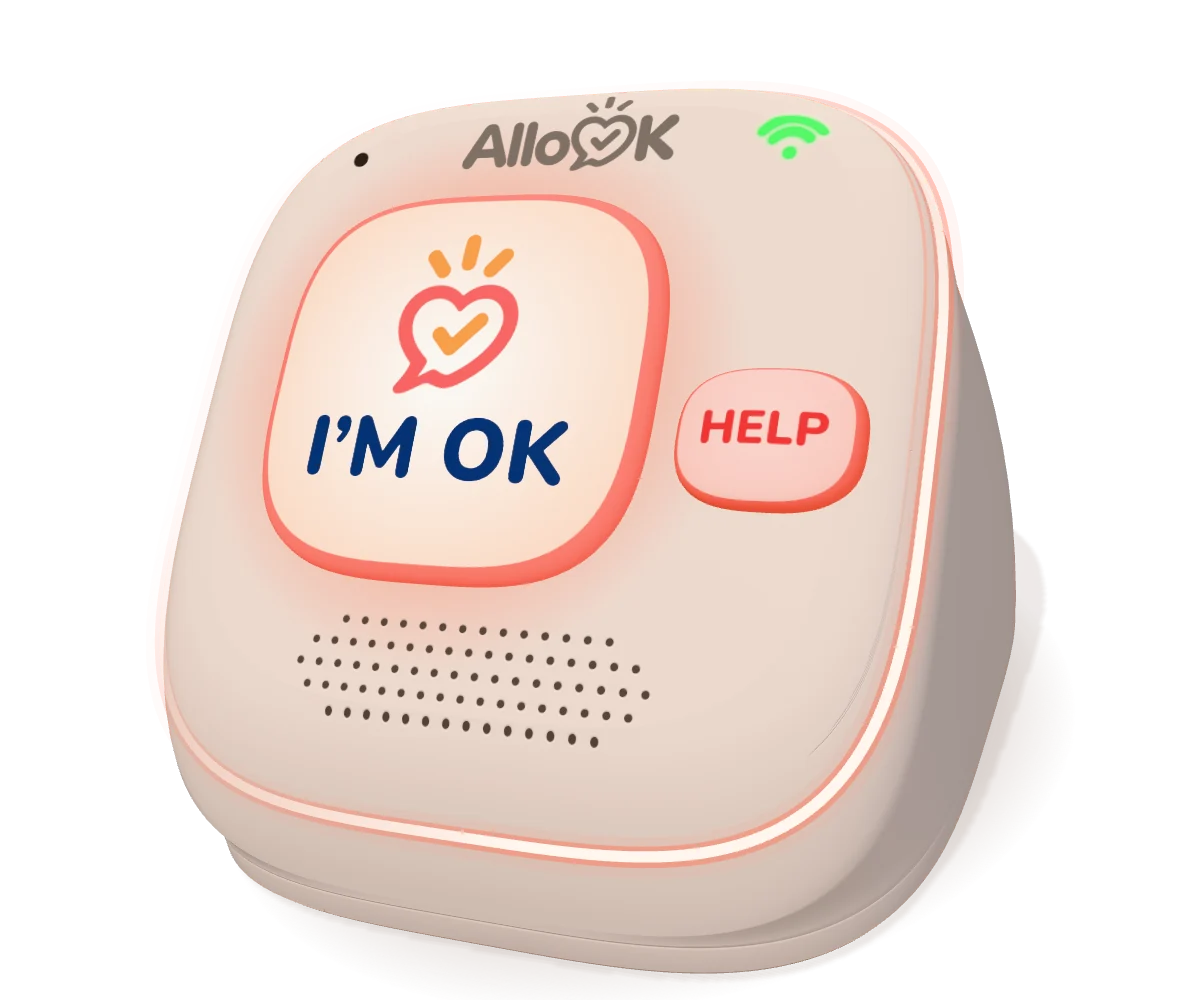
A simple device we’re developing for parents who prefer one big button. A gentle chime at the set time, one press, and the family sees that all is well.

A 3D model of the AlloOK Home concept: a rounded wedge with one large I’m OK button, a small help button, a Wi-Fi light and a speaker.

Concept model. In development, not yet for sale.

Planned features

You don’t need it to use AlloOK: texts and automatic calls already work without it.

Pricing and availability

AlloOK is currently in private iPhone testing.

Signups are closed

Free during early access

We’re preparing trials with families. Early access is free for participants.

Planned: $7.99 CAD a month

One price for the whole family after early access, with a 14-day free trial.

Proposed pricing, subject to change.

Questions families ask

Find answers about check-ins, family alerts and your account.

Contact support
Does my parent need a smartphone?

No. Your parent can reply OK by text or press a key on an automatic call. If they only use a landline, AlloOK calls instead of texting and makes a second call if they don’t answer. The parent app is optional and needs no email address or password.

What happens if they don’t answer?

AlloOK follows the reminder and call schedule your family sets. If your parent still hasn’t answered, everyone on their list is alerted together at the scheduled time. AlloOK retries failed texts. If nobody receives an alert, AlloOK resends it and follows up by phone.

What if my parent needs help?

They can tap “I need help” in the app or press 2 during the automatic call. A text reply other than a simple OK, such as “I fell,” also goes straight to the family.

Can several family members help?

Yes. Up to ten people per parent are alerted together. Once someone takes the alert, everyone can see who’s handling it. You can also add a nearby backup person, such as a neighbour. They get a text and a call only if the family hasn’t responded after three rounds of calls.

Does AlloOK detect falls or call emergency services?

No. AlloOK notices a missing daily response. It is not a fall detector, a medical device or an emergency service, and it never calls 911. If urgent help is needed, call 911 directly.

How do I manage my privacy or delete my account?

The privacy screen explains what AlloOK keeps and who can see it. You can also delete your account in the app after reviewing a warning.

Can I download AlloOK today?

AlloOK is in early iPhone testing. We’re preparing more testing with families before it reaches the App Store and Google Play.

Is AlloOK Home available to order?

AlloOK Home is a device concept in development. Orders are closed.

How do relatives join the care circle?

Each relative creates their own account and enters an invitation code. The code is valid for 24 hours. After ten incorrect codes, there’s a one-hour wait before trying again.

AlloOK support

Need help setting up a check-in, joining your family, or managing your account? Email us in English or French.

Email support

support@allook.ca